HERO
PLATFORM
WORKSPACE
JOURNEY
AI LAYER
ROUTING
SLA
STRUCTURE
AUDIT
DASHBOARDS
CraftHDX

Support, evolved.

Support tickets don't fail loudly. They fail quietly — unowned, unseen, overdue. CraftHDX is an intelligent helpdesk built on Odoo, around one simple rule: no ticket gets to hide.

ClassifierSOP AdvisorRisk AnalystDraftingComplianceSentiment
Every ticket, orchestrated end-to-end
"Who's actually handling this one?
"Are we about to miss the deadline?
"Where do we actually stand this week?
The platform

Answers to the questions every support team dreads.

Nine capabilities, each built to kill one recurring failure — in the words your team already uses.

Who's actually handling this one?
Smart assignment

Routed the moment it arrives — round-robin, by capacity, or by skill. Ownership is never a question.

01 / 09
Who's actually handling this one?
Smart assignment

Routed the moment it arrives — round-robin, by capacity, or by skill. Ownership is never a question.

Are we about to miss the deadline?
SLA countdowns with teeth

Safe, warning, breach — visible on every ticket, with alerts before the line is crossed and automatic escalation when it stalls.

What did we already tell the customer?
One thread, total recall

Every message, internal note and status change in one audited timeline — customer-facing and internal, clearly separated.

This 'one ticket' is really three problems.
Parent & sub-tickets

Split it. Each piece gets its own owner and its own clock — the parent closes only when they all do.

Half of this inbox is junk and copy-paste.
Inbox intelligence

Spam is scored out before anyone reads it; reference numbers and IDs are extracted into ticket fields automatically.

Where do we actually stand this week?
Live dashboards

Team performance, SLA health and ticket flow — in real time, not at month-end.

It stalled and nobody noticed for two days.
Escalation that fires itself

Idle tickets climb the ladder automatically — to a senior agent, then a manager — with the full trail attached.

Customers keep emailing to ask for updates.
Customer portal

Every requester sees their ticket status, history and expected resolution — without writing to ask.

The answer exists. Nobody can find it.
SOP & knowledge hub

Procedures live next to the tickets they resolve — suggested to agents at the moment they need them.

01 / 09
One workspace

Everything around the ticket lives with the ticket.

Chat, schedule, tasks, documents and knowledge — one place, zero app-switching, nothing lost between tools.

Ticket
Management
Discuss
Chat, mentions, voice and video — searchable, in context.
Calendar
Scheduling lives inside the system, synced both ways.
To-Do
Daily tasks tracked where the work actually happens.
Documents
Structured records — retrieval in seconds, not searches.
Knowledge
Reliable, current guidance maintained next to the tickets.
THE AGENT HOME

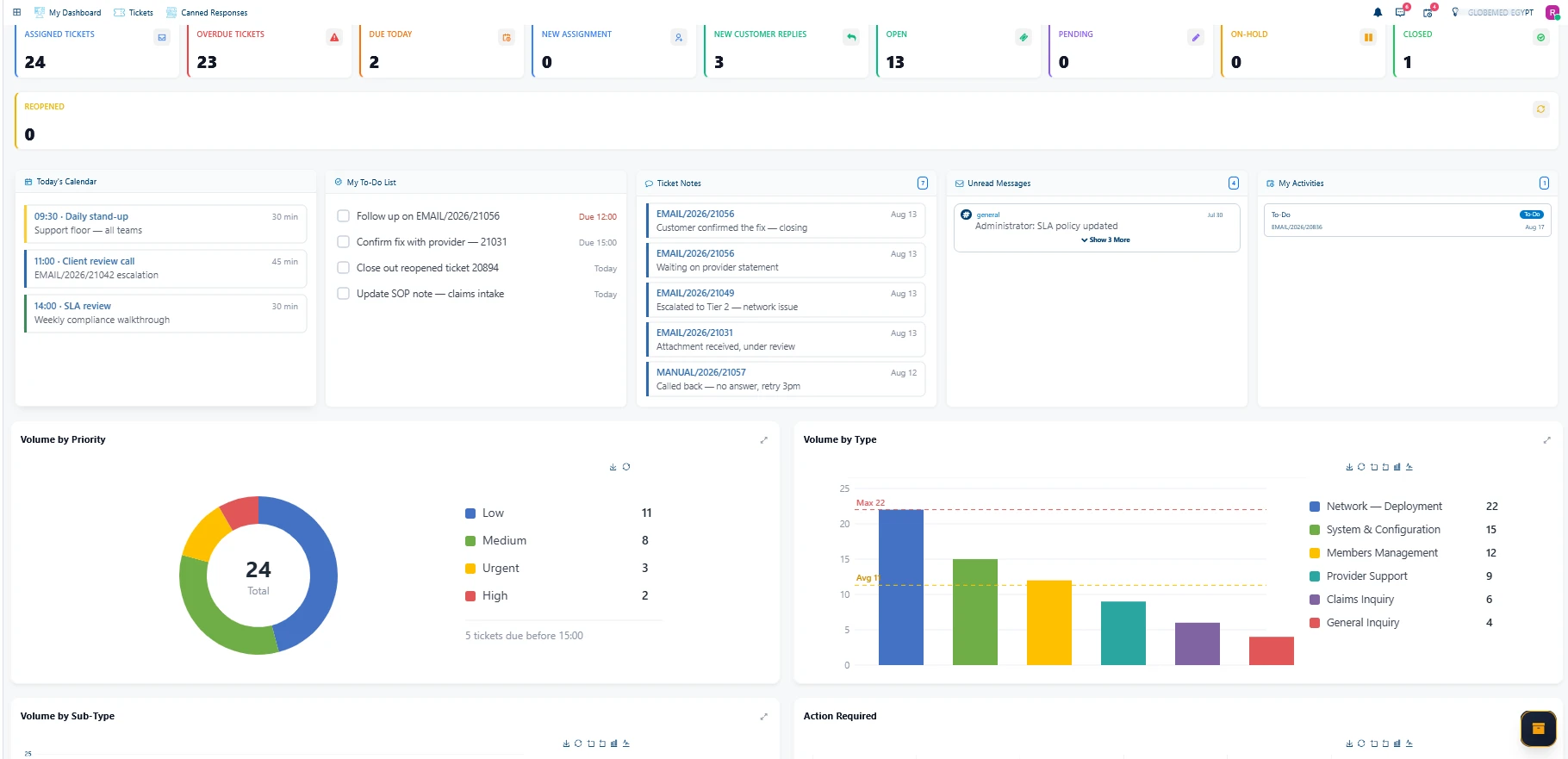
Your day, all in one view.

Before the first ticket is touched, the full picture is laid out — every pending task, open ticket and priority in plain sight. No searching, no guessing, no wasted motion.

3
OVERDUE
7
DUE TODAY
4
NEW REPLIES
1
REOPENED
A ticket's journey

From inbox to closed — nothing hides.

Five stages, each one owned, clocked and audited.

01

Arrives

Email, portal or API — deduplicated, spam-scored, reference IDs extracted.

02

Classified & routed

Tagged, prioritised and assigned to the right owner in seconds.

03

Homework done

History checked, SOP pinned, reply drafted — before the agent opens it.

04

Human replies

Your agent reviews, edits and sends. Every outgoing word is theirs.

05

Watched to close

SLA clocks, escalation ladders and the audit trail run to resolution.

The AI layer

The best AI is the work you never see.

While a ticket sits unopened, an orchestrated crew of agents does the homework. Your agent doesn't start the work — they review it.

Classifier
SOP Advisor
Risk Analyst
Drafting
Compliance
Sentiment
TICKET #4821
Refund not received
ARRIVED · UNOPENED
TICKET #4821
Refund not received
ARRIVED · UNOPENED
  1. Classifier
    Waiting
  2. SOP Advisor
    Waiting
  3. Risk Analyst
    Waiting
  4. Drafting
    Waiting
  5. Compliance
    Waiting
  6. Sentiment
    Waiting
TICKET #4821
Refund not received after cancellation
SLA · SAFE
CLASSIFIERBILLINGPRIORITY · HIGH
SOP ADVISORSOP-114 · Refund processing — pinned to case
RISK ANALYST4-year customer · 2nd billing issue — handle with care
DRAFTING“Hi Emma — you're right, the refund was issued to a closed card…”
COMPLIANCERefund within policy — no sign-off needed ✓
SENTIMENTTone: frustrated — lead with the apology
Ready for review — your agent starts from 90%.HUMAN IN CHARGE
Ticket arrived · unopened

A Master Orchestrator coordinates the crew. And the human stays in charge of every word that goes out.

Intake & routing

Order, before anyone opens the inbox.

Every arriving ticket is scored, structured and assigned in seconds — by rules you control, not by whoever happens to look first.

Tickets don’t get picked.
They get placed.

The moment a ticket lands, CraftHDX reads everything about it — who sent it, what it says, what it needs — and places it with the one person who should own it. A managed account reaches its account manager directly; an invoice question lands in billing because you wrote a rule that says so; a network fault finds the engineer certified to fix it.

When several people qualify, the least-loaded one wins — and a supervisor can always place a ticket by hand. However it routes, it’s your policy — executed in seconds, the same way every time.

#4825ARRIVESYOURPOLICYTHE OWNER
#4825 · JUST ARRIVED
Nile Health — managed account
WHY IT ROUTED THERE
The sender is a managed account — it goes straight to their account manager. No queue.
ACCOUNT MANAGER
R. QUINN
Owner — clock running
SLA governance

Deadlines with teeth.

Three clocks run on every ticket — with a reminder before the line, and an escalation after it.

SAFE25%
On track — the countdown is visible on the ticket itself.
WARNING72%
A reminder fires before the line is crossed, not after.
BREACH96%
Escalated automatically — management sees it immediately.
FIRST RESPONSE
Starts the moment the ticket is created — measures the first agent reply.
NEXT RESPONSE
Restarts on every customer reply, so nobody is ever left waiting twice.
RESOLUTION
Runs until the ticket is fully resolved and closed — no quiet stalls.
REMINDER · BEFORE THE DEADLINEWARNING · ON THE TICKETESCALATION · UP THE LADDER
Structure & automation

One ticket. Three problems? Split it.

Complex requests break into owned, clocked sub-tickets — and the repetitive work runs itself.

#4821 · PARENT
Warehouse data migration
OPEN · 0 OF 3
#4821-A✓
Data export
S. PARKERSLA 4H
#4821-B✓
Field mapping
M. BENNETTSLA 8H
#4821-C✓
Go-live checks
A. MORGANSLA 24H
ONE TICKET · THREE PROBLEMS
#4821 · PARENT
Warehouse data migration
OPEN · 0 OF 3
  • #4821-A✓
    Data export
    S. PARKERSLA 4H
  • #4821-B✓
    Field mapping
    M. BENNETTSLA 8H
  • #4821-C✓
    Go-live checks
    A. MORGANSLA 24H
ONE TICKET · THREE PROBLEMS
— THE AUTOMATION ENGINE

While your team slept, the rules kept working.

Anything your team does twice, the engine does for them — escalations, routing, reminders, clean-up — under rules they wrote, logged to the ticket, exactly once.

48
ACTIONS OVERNIGHT
0
TICKETS MISSED
1
RULEBOOK — YOURS
SETTLED OVERNIGHT2 TICKETS
✓#4788 · spam scored 98% — quarantined02:14
✓#4790 · idle 48h — escalated to manager05:31
FIELD TRACKINGSTAGE & LIFECYCLEINTERACTIONSSLA & REMINDERS
#4821AUDITED
The audit trail

Flawless memory.

Every adjustment, transition, conversation and deadline is permanently recorded — who, what and when, instantly retrievable.

Stage changes
First response time
Every response
Reminder history
Escalation history
Reopened lifecycles
Re-assignments & counts
SLA changes
Interactions per agent
Customer interactions
Stage changesFirst response timeEvery responseReminder historyEscalation history
Reopened lifecyclesRe-assignments & countsSLA changesInteractions per agentCustomer interactions
Dashboards

Where do we actually stand?

Straight from the product — not mockups. Every chart below is CraftHDX running on live ticket data.

Numbers a manager can act on.

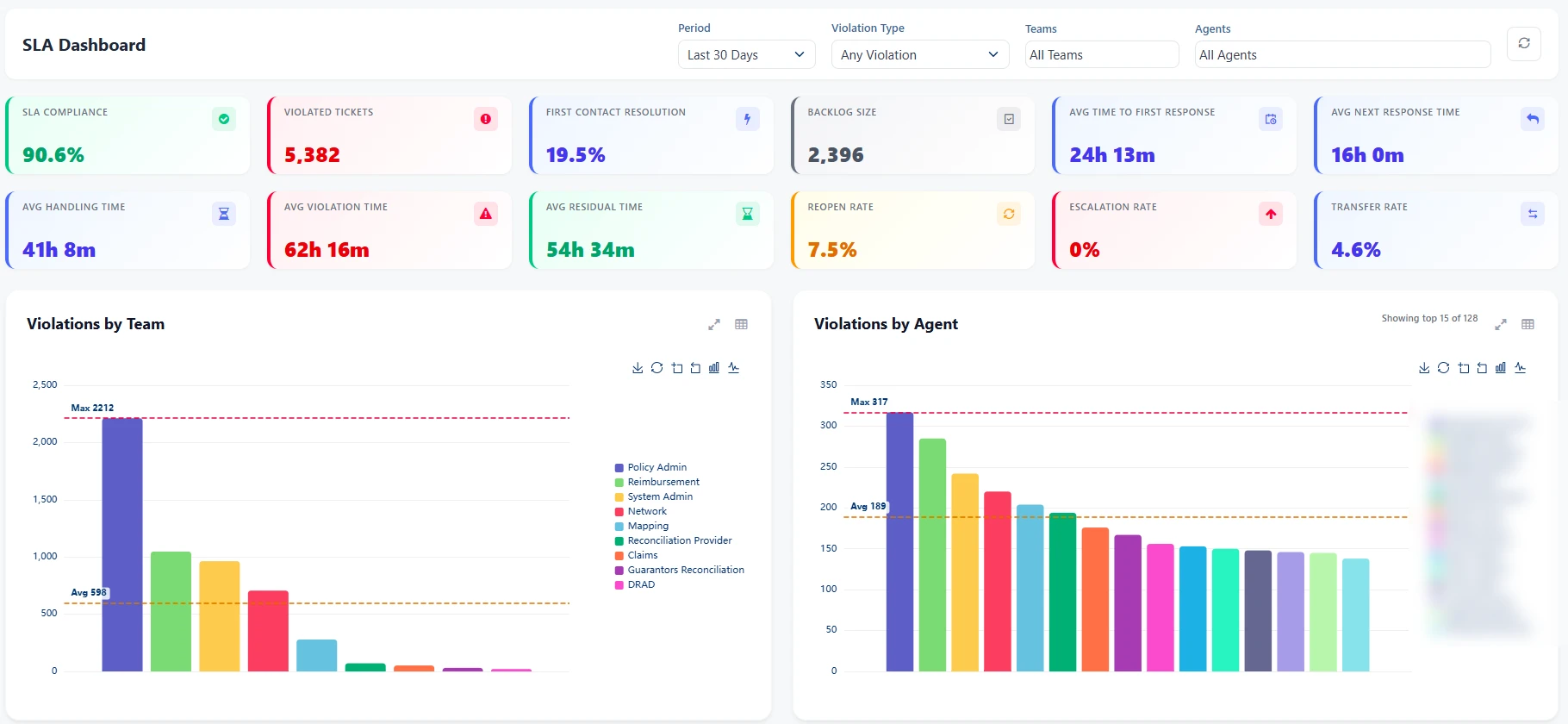
This is the SLA dashboard exactly as it ships — every violation attributed to a team, an agent and an hour of the day, live from the product rather than assembled at month-end.

90.6%
SLA compliance
25,701
Tickets measured
19.5%
First-contact resolution
0%
Escalation rate
Sample data · your dashboard, your numbers
CraftHDX SLA dashboard
Filter by team, agent, period
Compliance at a glance
Every violation attributed
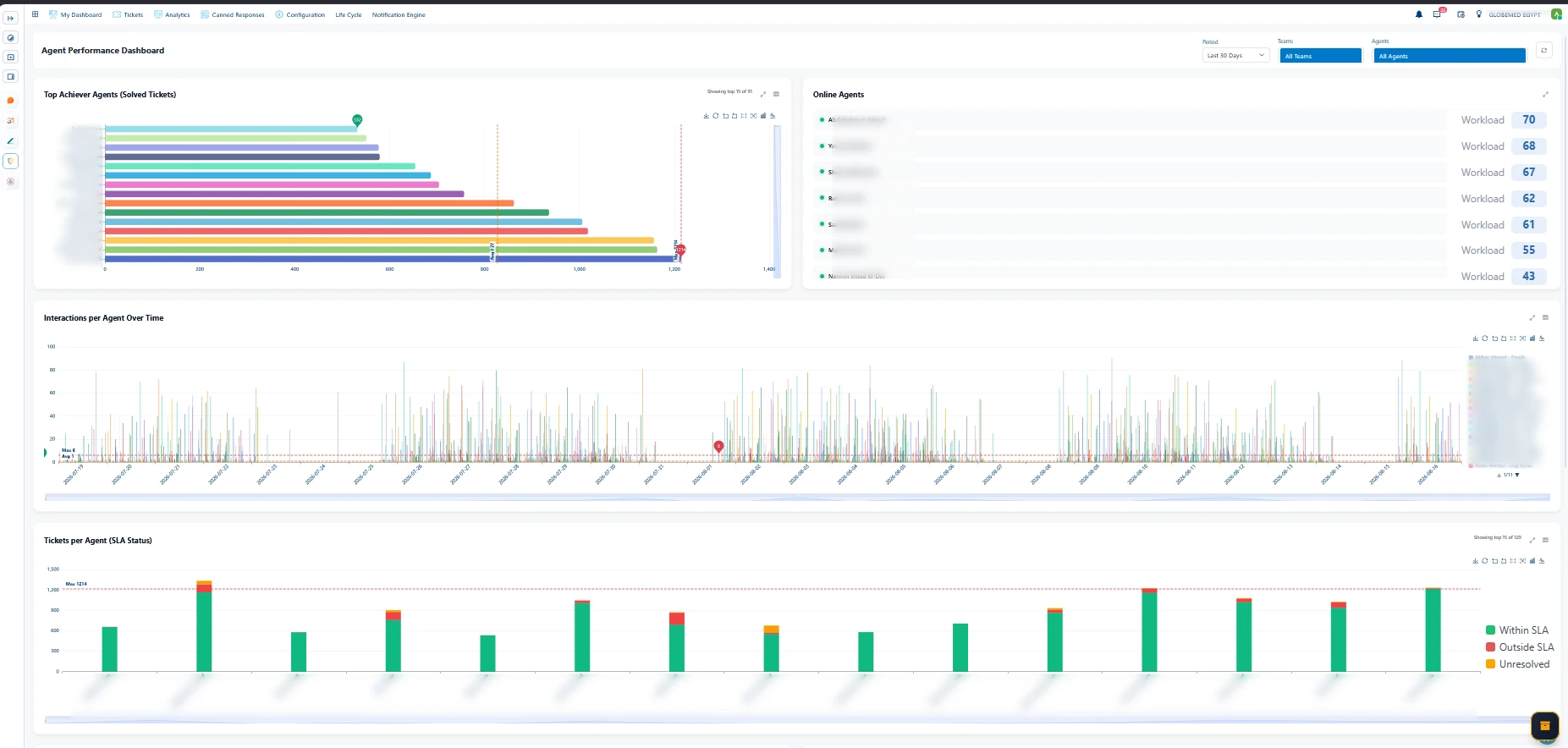
CraftHDX agent performance dashboard
Solved tickets, ranked
Live workload per agent
Every ticket: in or out of SLA

Effort, made visible and fair.

Who solved what, who's online, who's carrying the queue — per agent, per team, updated as it happens. Reviews stop being arguments; the numbers are already agreed on.

My day
My day — CraftHDX dashboard
SLA compliance
SLA compliance — CraftHDX dashboard
Agent performance
Agent performance — CraftHDX dashboard

Live dashboards straight from the product — the agent's day, SLA compliance and team performance.

Sample data · your dashboard, your numbers
CRAFTHDX · My dayLIVE · LAST 30 DAYS
My day — CraftHDX dashboard
Swipe the dashboard to explore →

The agent's own landing screen — queue, calendar, to-dos, notes and volume, before the first ticket is touched.

Sample data · your dashboard, your numbers

See your own tickets in it.

A 30-minute walkthrough with your real workflow in mind — no slideware.

Request a demoChat on WhatsApp